
How to Choose a Power Distribution Strip?

Choosing a Power Distribution Strip is not simply a matter of counting outlets. It is a small infrastructure decision with real safety and reliability consequences. The strip may sit beneath a desk, behind a server rack, or beside a workshop bench. Its environment matters.

The Uptime Institute’s 2023 Global Data Center Survey reported that power problems remained among the leading causes of serious data-center outages. That finding applies beyond data centers. A loose connection, overloaded circuit, or unsuitable cable can also interrupt offices, laboratories, and home workstations. The U.S. National Fire Protection Association’s NFPA 70 standard stresses correct loading, grounding, and overcurrent protection. Product markings still need careful verification.

Patrick Donovan, a senior research analyst at Schneider Electric, offers a useful warning: “Power quality is often overlooked until it becomes a problem.” That sentence sounds obvious. It is also easy to ignore.

A reliable selection process examines rated voltage, current capacity, plug type, cable length, breaker protection, surge performance, and certification. UL 1363 and IEC-based requirements may apply differently across markets. Therefore, one attractive specification sheet cannot answer every question. It is better to match the strip with the actual equipment load.

Do not confuse surge suppression with backup power. Do not assume that more sockets mean greater capacity. A six-outlet strip may be safer than a twelve-outlet model when its enclosure, contacts, and thermal protection are stronger. Buyers should also inspect heat buildup, damaged plugs, and daisy-chained extensions. These details are unglamorous. They are often where reliability begins.
How to Choose a Power Distribution Strip?

What Is a Power Distribution Strip and How Does It Work?

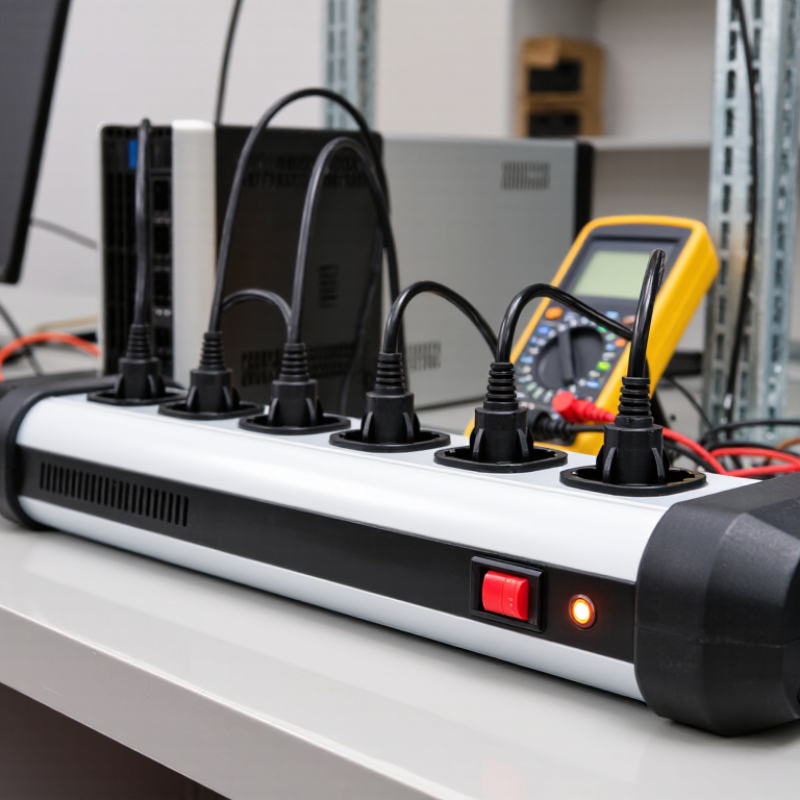
A power distribution strip is a device that divides one electrical supply into several usable outlets. It usually contains an input cable, internal conductors, outlet contacts, and a protective housing. When connected to a wall socket, electricity travels through the strip’s internal busbar to each outlet. Every connected appliance receives power from the same source.

Some strips include a circuit breaker that interrupts current during overloads. Others add surge protection, which helps reduce brief voltage spikes. This protection has limits. It cannot correct unsafe wiring or replace a building’s grounding system. A grounded design is important, especially for computers, workshop tools, and appliances with metal cases. Check the rated voltage, maximum current, cable thickness, and total wattage before buying. Add the wattage of every device, not just the largest one. Leave a safety margin.

Look closely at the outlet spacing. Large adapters can block nearby sockets. In a workshop, a switch with overload protection may be useful, while a home office may need spaced outlets and clear status indicators. Do not connect one distribution strip to another. It increases connection points and can exceed the circuit’s safe capacity. I used to focus mainly on the number of outlets, but that was incomplete. A long cable, warm plug, or loose socket can matter more. Stop using the strip if it smells hot, shows discoloration, or feels unusually warm.

How to Choose a Power Distribution Strip?

What Is a Power Distribution Strip and How Does It Work?

A power distribution strip distributes electricity from one wall outlet to several devices through multiple sockets. Choose a strip by checking its voltage, maximum current, total wattage, socket type, grounding, overload protection, and surge-protection requirements.

How to read the chart: Rated power is calculated as voltage × current. These examples show the maximum electrical rating of common configurations, not the recommended continuous operating load. Always follow the rating printed on the strip, wall outlet, and local electrical regulations. High-power appliances such as heaters, kettles, and hair dryers may require a dedicated outlet.

How to Match the Strip With Your Power and Device Requirements

Choosing a power distribution strip starts with the devices, not the number of outlets.

Add each device’s wattage, then divide the total by the supply voltage to estimate current. Leave at least 20% headroom for startup surges and measurement error. Measure before buying.

A desktop computer, monitor, heater, and laser printer can exceed a basic 10A strip quickly. Never connect heating appliances or high-load tools unless the strip is specifically rated for them.

Check the strip’s maximum current, voltage, cable rating, plug type, and surge-protection specification.

A higher joule rating may absorb more transient energy, but it cannot correct sustained overloads or poor wiring. Confirm that the protection status indicator works, and replace the strip after serious surge damage, heat marks, or a loose socket.

The National Fire Protection Association reported an estimated 32,240 home fires involving electrical distribution and lighting equipment each year from 2016 to 2020. Small accessories still deserve careful inspection.

Device compatibility also includes timing and environment.

Network equipment may need continuous operation, while workshop devices can create strong inrush currents. Keep ventilation openings clear and avoid damp areas.

Uptime Institute’s 2024 Annual Outage Analysis found that 54% of surveyed organizations reported their latest outage cost over $100,000.

That figure is not a reason to overspend blindly. It is a reminder to match capacity, protection, and backup planning.

I sometimes see people choose by outlet count alone. That shortcut feels convenient, but it remains technically weak. Consult a qualified electrician when loads, grounding, or local electrical requirements are uncertain.

Which Safety Features Should You Check Before Buying?

When choosing a power distribution strip, inspect its safety features before counting outlets. Look for overload protection, a resettable circuit breaker, and a heat-resistant enclosure. These features can reduce risks when several devices operate together. A surge protector may help protect electronics from voltage spikes, but it is not the same as overload protection. Check both ratings.

Examine the plug, cable, and outlet spacing carefully. The cable should suit the strip’s rated current and feel flexible, not brittle. Grounded outlets are important for compatible appliances. Child-protection shutters can prevent accidental contact with live parts. Look for clear electrical ratings and independent safety certification. Vague labels deserve caution. I once trusted a heavy-looking strip without checking its current rating. That was careless.

Tips:

  • Add the wattage of connected devices before plugging them in.
  • Keep heaters and other high-power appliances on suitable dedicated outlets.
  • Do not connect one power strip to another.
  • Leave air around the strip, especially beneath desks or behind cabinets.
  • Stop using it if the casing becomes hot, smells unusual, sparks, or shows discoloration.
  • Test the breaker only as directed by the instructions.
  • A small oversight can matter.
  • Also, inspect the cable regularly, because damage is easy to miss during everyday use.

How to Choose the Right Number, Type, and Spacing of Outlets?

How to Choose a Power Distribution Strip?

Choosing a power distribution strip starts with outlet count, not appearance. Count every device, including monitors, chargers, lamps, and future equipment. Leave two unused outlets for expansion. My first count is often wrong. Measure twice. Uptime Institute’s 2024 Global Data Center Survey reported that 53% of respondents experienced an outage during the previous three years. This makes capacity planning more than a convenience issue.

Select outlet types according to your equipment. Standard sockets suit general office devices, while USB-C ports can reduce charger clutter. Avoid mixing incompatible plug standards. Spacing matters too. Wide adapters can block adjacent outlets, especially near a desk leg or cable tray. Choose separated outlets when chargers have large transformer blocks. A 45-degree layout may improve access, but it can increase cable strain. Check the strip’s rated voltage, current, surge protection, and overload cutoff. NFPA’s Electrical Fires report recorded an estimated 33,900 U.S. home fires involving electrical distribution and lighting equipment annually from 2015 to 2019. Protection cannot replace correct loading. Keep margin. A strip rated for 15 amps should not carry a continuous load near its limit. Record the expected wattage, then verify it against the product documentation and local electrical requirements.

How to Choose a Power Distribution Strip? – How to Choose the Right Number, Type, and Spacing of Outlets?
Typical Use Recommended Outlet Count Outlet Type to Match Recommended Outlet Spacing Typical Electrical Rating Suitable Equipment Selection Guidance
Basic home workstation 4–6 outlets Use the socket standard required by the local electrical system. For example, NEMA 5-15R is common on 120 V systems, while BS 1363 or Schuko outlets are used in other regions. Standard spacing of approximately 38–50 mm (1.5–2 in) Commonly up to 15 A at 120 V or up to 16 A at 230 V, depending on the local standard and product rating Computer, monitor, desk lamp, speakers, charger
Home entertainment system 6–8 outlets Match the local wall-socket standard. Angled or widely spaced outlets can make bulky adapters easier to connect. Approximately 50–76 mm (2–3 in) when several plug-in adapters are used Usually 15 A at 120 V or 16 A at 230 V, subject to the strip’s label and local regulations Television, game console, media player, sound system, router Allow extra space around large power adapters and avoid forcing multiple bulky plugs into adjacent sockets.
Office desk cluster 8–10 outlets Use compatible grounded outlets for computers and office equipment. USB charging ports may be added for low-power devices. Standard spacing for ordinary plugs; 50–76 mm (2–3 in) for transformer-style adapters Do not exceed the marked current or wattage limit. A 15 A, 120 V strip has a nominal maximum of 1,800 W, but continuous loading should be kept below the circuit limit. Computers, displays, printers, network equipment, chargers Calculate the combined load and leave capacity for inrush current from printers or other motor-driven equipment.
Home workshop or hobby area 6–8 outlets Use grounded outlets with suitable protection for the tools and environment. Select a heavy-duty construction where appropriate. Approximately 50–76 mm (2–3 in) for large tool plugs and adapters Use only the rating allowed by the branch circuit, plug, cable, and power strip. Motors and heating tools may draw high starting or operating current. Small power tools, soldering equipment, task lighting, battery chargers Do not use a standard indoor strip in damp, dusty, outdoor, or chemically exposed locations unless it is specifically rated for that environment.
Server rack or network cabinet 8–12 outlets Rack-mounted strips commonly use IEC C13 outlets for equipment with IEC C14 power inlets; the input plug and voltage must match the installation. Commonly arranged for rack equipment; verify that outlet locations do not interfere with cable management or rear-mounted power supplies. Typical rack strips may be rated for 10 A, 16 A, or another value. The rating must not exceed the rack circuit, connector, or cable capacity. Servers, switches, routers, storage systems, monitoring equipment Choose outlet orientation, cable length, circuit monitoring, and mounting hardware based on rack layout and service access.
Large adapter or wall-wart setup 4–6 outlets Use the correct local socket type with wide-spaced or alternating outlets. USB ports do not replace grounded AC outlets. Approximately 63–100 mm (2.5–4 in) between selected outlets, depending on adapter size Respect both the total current limit and the individual outlet design. A strip may have a high total rating but still have limited usable space. External hard-drive adapters, laptop chargers, audio equipment, test instruments
Travel or temporary use 3–6 outlets Use a strip designed for the destination’s voltage and plug system. A plug adapter changes shape, not voltage. Compact spacing is acceptable for standard plugs; allow more space if several chargers are used. Confirm the voltage, frequency, current rating, grounding arrangement, and required approvals for the destination country. Phone chargers, camera chargers, laptops, small low-power electronics Do not connect a 120 V-only device to a 230 V supply without suitable voltage conversion.
Important: Outlet count, spacing, voltage, current capacity, grounding, surge protection, and cord specifications vary by model and country. Always follow the rating label, local electrical code, and the equipment manufacturer’s instructions. Avoid connecting high-power heating appliances or one power strip into another unless the manufacturer and electrical code specifically permit it.

How to Compare Installation Options, Durability, and Extra Functions?

Choosing a power distribution strip requires more than counting outlets. Installation affects safety, access, and daily convenience. A desktop strip works well beside a monitor, while an under-desk model keeps cables away from feet. Wall-mounted options save space, but they require suitable screws and a solid surface. Do not rely on adhesive alone; it may loosen under heat or cable tension.

Durability depends on materials, construction, and the environment. Look for heat-resistant housing, firm outlet contacts, and a flexible but thick cable. A strip used in a workshop needs stronger protection than one used beside a lamp. Check the rated load before connecting heaters, printers, or other high-power equipment. I once underestimated cable weight, and the strip slowly shifted on the desk. Small details matter.

Extra functions should solve real problems. Surge protection, overload shutdown, individual switches, USB charging, and spaced outlets can improve usability. However, more features do not always mean better performance. USB ports may become outdated, and bright indicator lights can disturb sleep. A resettable breaker is useful, but it cannot replace careful load management. Compare certification information, warranty terms, and independent test evidence where available. Specifications can look impressive. Practical fit matters more.

Blogs